isaharVoice
← All integrations

Magento 2

NATIVE INTEGRATION

Every call, with the customer's order already on screen. Connect Magento once and see the customer on every call, from the very first, with no copy-paste between windows.
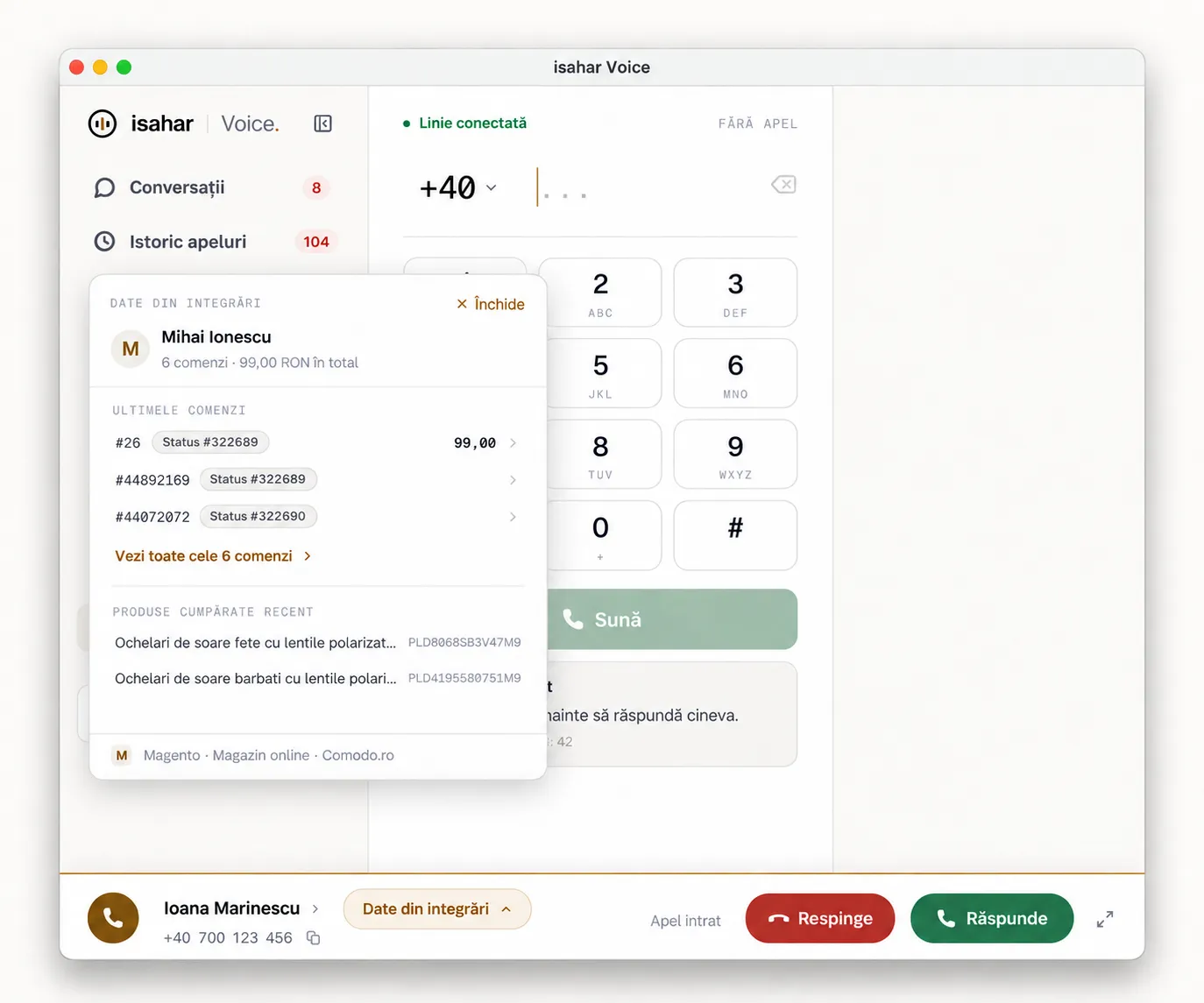
The customer's order and history appear automatically, before you answer
Note the call directly on the order, without opening Magento separately
New customers arrive instantly through a webhook, with no sync delay
The isahar Voice desktop app showing Magento customer and order details during an incoming call

From screen pop to order notes — the whole flow, in one place

On every call, isahar Voice searches for the number in Magento 2 and shows the customer's order before you answer. From there you can note the call directly on the order, call back with one click, or let new customers reach isahar Voice automatically through a webhook.

Instant screen pop
When a customer calls, isahar Voice searches Magento's customers and orders and shows the name, recent orders and their value before you answer.
Customizable Caller Insights
Choose directly from Magento what the agent sees and in what order — recent orders, recently purchased products, customer group, total spend or custom fields.
Screen pop from the first call
A webhook from Magento notifies isahar Voice the moment a new customer or order appears, with no need to wait for a scheduled sync.
Notes right on the order
After a call, the agent notes what was discussed directly on the customer order, with the date, agent and a link to the recording.
Click-to-call from Magento
Phone numbers on the order and customer pages become call buttons — one click starts the call from isahar Voice.
Bulk sync
All customers already in Magento can be sent to isahar Voice from a single command, or automatically once a day.
Call history inside Magento
A "Calls" tab appears on every customer record, with the full call history and recording playback, without leaving Magento.
Multi-store support
Each phone number can be linked to a specific store, so the agent always sees orders from the right store.

How the installation works

Three steps, from the API key to the first call with the customer's order on screen.

1
Create an API key
From isahar Voice, under Admin → Integrations → API keys.
2
Install the Magento module
A few standard Magento commands, then add the key under Stores → Configuration → Isahar → Voice.
3
The integration is live
Calls show the customer and their orders, agents can note calls on orders, and new customers and orders reach isahar Voice automatically.

Works with Magento Open Source or Adobe Commerce 2.4.x, PHP 8.1–8.3. You need an isahar Voice account with an API key — the trial plan is enough to test it.

The module is not yet published on the Magento Marketplace or on public Packagist — installation today is done through a direct repository reference, with help from the isahar Voice team.Contact us for the installation steps →

Connect to any Magento installation

Choose the authentication method that matches your store configuration and test the connection before enabling the integration.

Administrator username and password
The token is obtained automatically and renewed when it expires.
Bearer token
Connect directly using a Magento token.
OAuth 1
Consumer Key, Consumer Secret, Access Token and Access Token Secret for installations using this authentication method.

The connection is verified before it is saved. The integration will not be enabled if the credentials are incorrect.

What the integration does not do

It never modifies orders, prices or stock
The only thing it ever writes to Magento is the comment on an order after a call. It never cancels orders or changes prices or stock.
It never exposes sensitive data in the browser
The API key and webhook secret stay server-side. Only data already approved for the agent (name, orders, contact details) and temporary, signed links to recordings reach the browser.

Your data and integration remain under your control

Tokens and passwords are encrypted in the database and are never stored in plain text.
You can connect or disconnect the integration at any time from the administration panel.
Matched data is saved to the isahar Voice address book, making future callers faster to identify.
You do not need to contact support to enable or disable the integration.

See the order, note the call, keep the history current

Test the Magento integration with your team, directly in the isahar Voice application.

Start free trialContact us
isahar Voice · a product by isahar